Water Eject App
Access speaker-cleaning tones online across supported iPhone and Android browsers without installing a separate native application or APK.
- Disconnect your phone from all charging cables before playing sound.
- Do not use audio playback for wet charging ports (allow them to dry naturally).
- Start at a moderate volume and use brief playback attempts.
- Stop immediately if you detect distortion, device heating, or buzzing.
- Follow your device manufacturer's liquid-exposure guidance for severe spills.
Last reviewed: August 2026
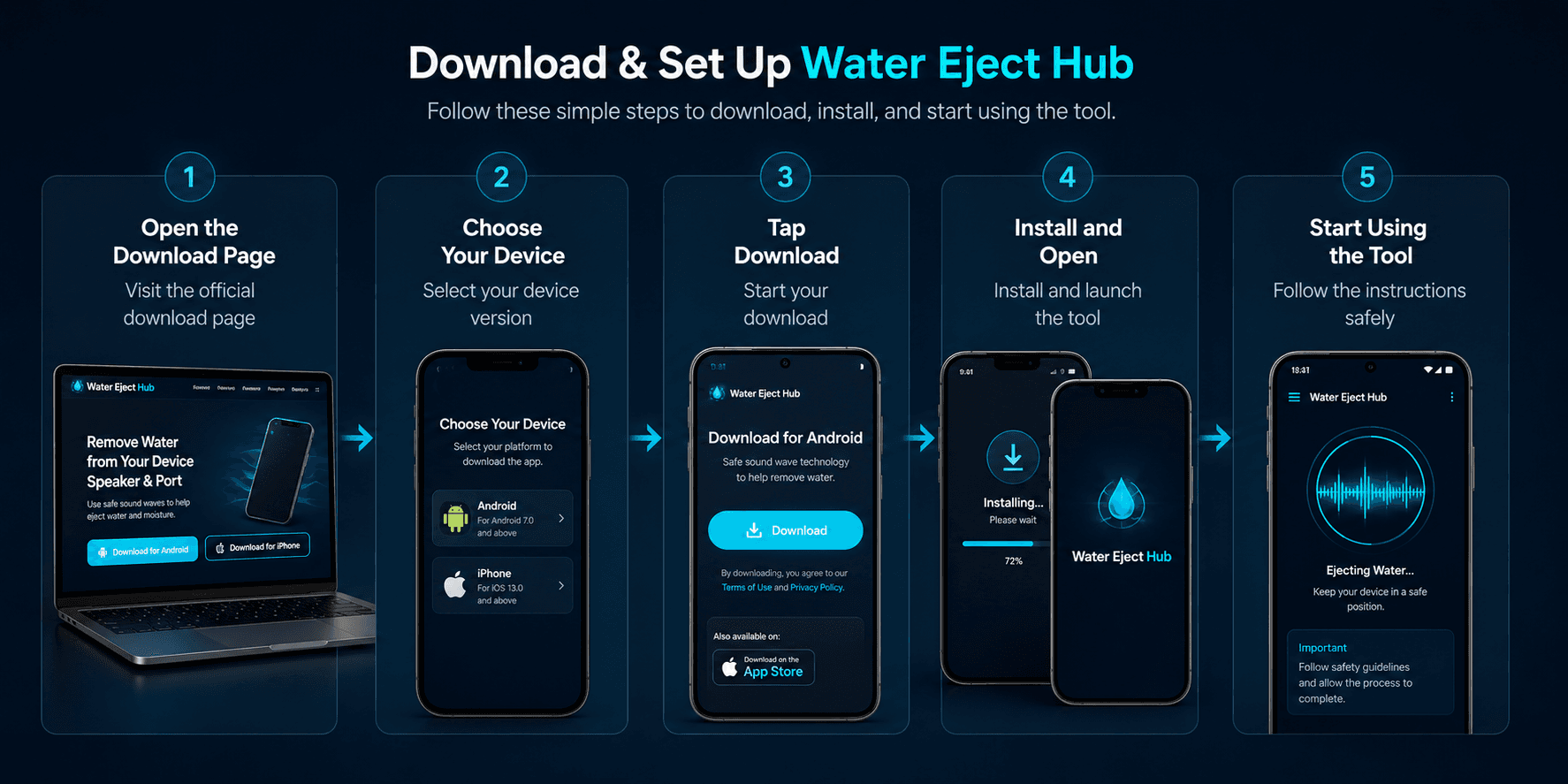
Visual guide showing how users can access the Water Eject App online and follow the download steps.
What Is the Water Eject Web App?
Water Eject Hub provides browser-based access through common mobile browsers such as Safari, Chrome, and Samsung Internet. The sound vibrates the phone’s speaker and moves air near the external grille.
Basic browser sound playback should not require access to your camera, contacts, photos, or microphone. No separate native application or APK installation is required.
How Can You Access the Tool?
Water Eject Web Tool
Launch the primary tone generator in Safari, Chrome, Samsung Internet, Edge, or Firefox. Provides browser-based sound playback through the main Water Eject tool.
- No app store account or login needed
- No separate application installation required
- Runs in supported mobile browsers
Water Eject iPhone
Learn how to run speaker-cleaning tones in Mobile Safari on iOS, manage media volume separation, verify Bluetooth routing, and explore Siri Shortcuts.
- Optimized for supported iOS Safari versions
- Step-by-step Siri Shortcut instructions
- Speaker-down orientation techniques
Water Eject Android
Access browser-based speaker-cleaning sound on Galaxy, Pixel, and other supported Android devices. Review media-volume, audio-routing, and passive-drying guidance.
- Compatible with modern Android browsers
- Media volume channel separation guidance
- Speaker playback and routing guidance
Home-Screen Shortcut
Add a direct web shortcut to your home screen for emergency access without visiting an app store:
- iPhone: In Safari, tap Share → "Add to Home Screen"
- Android: In Chrome, tap Menu (⋮) → "Add to Home screen"
- Creates a quick launcher pointing to the web utility
Is a Download Required?
Many websites promote downloadable files or unofficial APK packages for speaker cleaning. In reality, supported mobile browsers can generate low-frequency audio without requiring a separately installed application.
The browser tool also offers these benefits:
- Avoids Third-Party APK Installation: Using the browser tool means you do not need to install an unknown APK or executable file.
- No Special Hardware Permissions: Basic sound playback should not require access to your camera, contacts, photos, or microphone.
- No Subscription Paywalls: Provides open sound frequency generation without unexpected trial subscriptions or in-app purchases.
- Instant Availability: Ready to use immediately during accidental moisture exposure without waiting for app store downloads.
How to Use It on iPhone
When using an iPhone, Safari processes sound frequencies directly through the iOS audio stack. Follow these practical steps for effective acoustic testing:
-
1Open Safari and Load the Tool Navigate to the Water Eject Tool homepage in Apple Safari.
-
2Disconnect Wireless Audio & Adjust Volume Disconnect AirPods, Bluetooth speakers, or CarPlay, and set media volume to a moderate level to protect the speaker voice coil.
-
3Position Speaker Downward & Test Gently point speaker openings downward. Use brief playback attempts and pause between them to check the speaker.
For detailed iOS guidance or automation setup, read our Water Eject iPhone guide and Shortcut Guide.
How to Use It on Android
Browser audio is normally controlled through the Media Volume channel, although audio routing may vary by device, browser, operating-system version, and connected accessories.
-
1Open Your Preferred Android Browser Launch Google Chrome, Samsung Internet, or Firefox and visit the main tool.
-
2Verify Media Volume & Disconnect Bluetooth Ensure media audio is turned on and disconnect wireless audio accessories so playback routes through the device speaker.
-
3Test Available Frequencies Try the available low-frequency tones at moderate volume. Speaker response varies by device, so no single frequency is guaranteed to work for every phone.
-
4Hold Speaker-Down & Allow Resting Intervals Angle the speaker downward, use brief playback attempts, and allow resting intervals for moisture to evaporate naturally.
For model-specific tips on Samsung and Pixel devices, visit our dedicated Water Eject Android guide and try our Speaker Cleaner tool.
How Speaker-Cleaning Sound Works
Smartphone speakers use a small permanent magnet and voice coil to vibrate a flexible diaphragm. Playing a low-frequency tone moves the diaphragm back and forth, pushing small air pulses outward through the speaker mesh.
If water droplets are clinging to the exterior grille mesh, these air pulses can help break surface tension and shift droplets outward. No single tone, including 165Hz, works universally for every device. For full details on sound vibration, read our How It Works guide.
What the Tool Can Do
Diaphragm Vibration
Creates speaker vibration and outward air movement using the available low-frequency sound.
Dislodge Mesh Droplets
Helps overcome the surface tension of minor liquid droplets clinging to the external acoustic mesh openings.
Sound Clarity Check
Provides clean reference tones to assist users in comparing perceived speaker output before and after resting intervals.
Important Tool Limitations
What the Tool Cannot Do
To ensure device safety and accurate expectations, Water Eject Hub explicitly notes the following technical boundaries:
-
No Moisture Detection: Browsers cannot scan, detect, or quantify water presence inside a smartphone.
-
No Deep Liquid Extraction: Sound vibrations cannot draw moisture out from internal logic boards or battery cavities.
-
Cannot Dry Charging Ports: Sound does not clear USB-C or Lightning pins. Review our Charging Port Guide.
-
Cannot Repair Hardware: Acoustic waves cannot repair torn membranes, shorted voice coils, or electrical corrosion.
-
Results Depend on Conditions: Outcomes vary based on droplet volume, speaker angle, grille condition, and device design.
-
Not Authorized Service: For heavy water submersion, always follow manufacturer instructions and seek official service.
Safe Usage Guidelines
Moderate Volume
Begin playback at moderate volume levels to avoid placing excessive thermal or mechanical strain on micro-speaker voice coils.
Short Cycles
Run sound in brief intervals. Pause between attempts to inspect the speaker grille rather than looping audio continuously.
Avoid Destructive Tactics
Never insert cotton swabs, toothpicks, compressed air nozzles, or hair dryer heat into speaker openings, which can push water deeper.
Passive Drying First
Position your phone speaker-down in a well-ventilated room with gentle airflow to allow natural evaporation between tests.
What If the Speaker Stays Muffled?
Persistent audio distortion or muffling after testing generally indicates one of three situations:
- Residual Moisture Behind Mesh: Liquid film often requires time to evaporate completely. Place the device speaker-down on a lint-free microfiber cloth in a well-ventilated space with steady airflow for several hours. For broader recovery steps, read How to Get Water Out of Phone.
- Audio Routing / Output Selection: Confirm that the phone has not routed sound to a paired Bluetooth device, wireless headset, or hearing aid. Check your device's audio output picker.
- Hardware Damage or Debris: If the phone experienced deep submersion or contact with sticky liquids (such as soda or seawater), residue may be obstructing the diaphragm or corrosion may have begun. In this scenario, discontinue playback and contact an authorized repair center. If you have questions about our web tool, visit Support.